From an arrival time to a car someone can actually collect
A traveller searching for a rental car usually has a journey in mind before they have a model in mind. Their flight lands late, two children need seats, and four suitcases have to fit in the boot. A beautiful photograph of a car answers only one of those questions. A useful rental website lets that traveller enter collection and return details first, discover suitable vehicles and understand the amount they would pay. The same information should reach the rental desk in a form that a colleague can act on without asking the customer to type it again.
When we discuss a website for a rental business, I like to start with one ordinary handover. Where was the reservation received? Who checked the car, prepared the keys and met the driver? What information arrived too late? An airport transfer desk, a neighbourhood van hire business and a company renting classic cars for weddings take very different bookings. The right booking form starts with the questions your team already asks. One realistic journey through your business gives us a better starting point than a long list of features.
Make availability meaningful at both ends of the trip
The collection time is only half of an availability check. Suppose someone returns a car to the city branch on Friday afternoon and another customer requests it at the airport an hour later. Both dates may look available on a calendar while the second handover is physically impossible. Your booking rules can account for the return location, preparation time and the person who needs to move the car. If a staff member must approve that transfer, the customer should see when to expect confirmation.
Another decision is whether a visitor books a specific vehicle or a category. A couple hiring a distinctive car for photographs may care about its exact colour. A family may be happy with any automatic car that fits their luggage. Those promises need different wording on the vehicle page and different availability records behind it. We can work through a cancellation, a car taken out for maintenance and two requests arriving together to check that staff see the same commitment the visitor sees.
Turn the rate sheet into a quote that can be checked
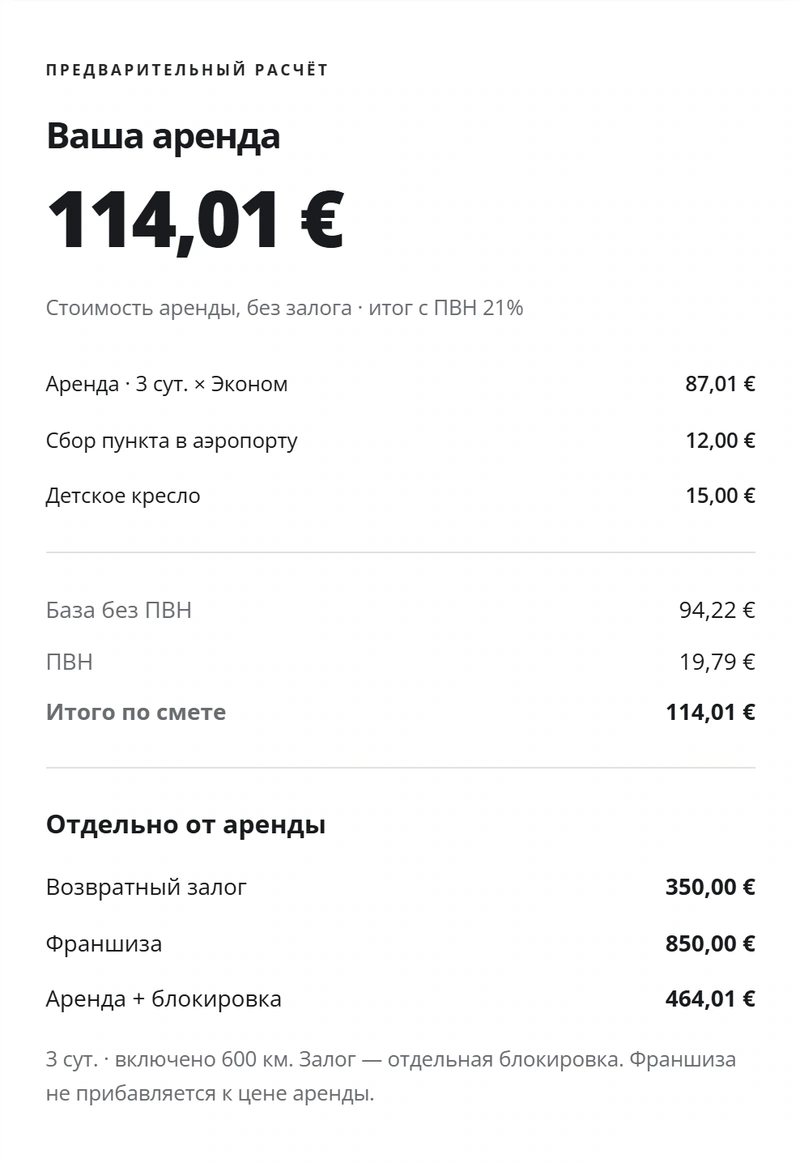
Bring the sheet that your team actually uses to prepare prices. Pick a booking you have already completed and explain it from the dates through to the final total. Does a day mean a calendar day or a period starting at collection? When does a weekly rate become available? Is delivery charged once or in both directions? These decisions can make two sensible calculations produce different amounts. The website should follow the interpretation your business confirms and show the chosen dates, times and currency beside the result.
A good quote makes the source of a change easy to find. If a visitor adds a child seat, they should see whether the charge applies per booking or per day. A change of return branch should update the line for that service. A refundable deposit deserves its own line and a plain explanation of when it is required. Keeping the rental charge and money held as security distinct helps a traveller compare cars and gives the rental desk a clear record if the customer calls later.
Help someone choose the right vehicle on a phone
Capacity is often more informative than an equipment list. Show useful photographs of the boot, rear seats and loading area alongside the exterior. A customer choosing a van may need the opening width and usable floor length. A parent may want to check whether the reserved child seats leave room for another passenger. Use measurements checked against the vehicles in your fleet. Where an image represents a category, say so and explain which features the reservation guarantees.
The most useful comparison keeps the dates in place while the customer changes vehicle. On a phone, two options can appear one after another with the same short list of facts in the same order. A visitor can then compare luggage space, transmission, included distance and total price without memorising an earlier screen. When there is no suitable result, offer a practical next step such as changing collection time or asking about another branch. Preserve the journey details so the customer can try again easily.
Connect the reservation with the person doing the handover
Once a request arrives, the website has done only part of its job. Decide who owns the next step during the day and after closing. A useful staff view can separate enquiries awaiting review, confirmed rentals, vehicles due back and vehicles awaiting preparation. The person handing over the keys needs the confirmed location and extras. The colleague planning tomorrow’s fleet needs the expected return and any preparation time. Each person can receive the relevant details without searching an entire email conversation.
Returning the vehicle deserves the same attention as collecting it. Imagine a customer calling to extend a rental by a day. Staff need to see the effect on the next reservation before promising the extension. We can plan a clear sequence for checking the vehicle, issuing an updated quote and recording the customer's decision. The booking keeps its original terms and the agreed amendment. If somebody opens it a week later, they can understand what changed and use the correct version when speaking with the customer.
Try a rental journey before commissioning integrations
The E-PORTAL car rental demonstration is a place to explore how a rental enquiry might begin. For a first review, bring a typical booking from your own business with personal details removed. Try describing the journey as a visitor would. Write down where you expected to choose a detail, which figure you wanted explained and what you would need at the counter to prepare the handover. Those observations give us concrete material for a prototype that belongs to your business.
For a custom build, the next step may be a connection to your booking software, a payment provider or a fleet calendar. First we identify which system owns availability and which one owns the price. Then we test a real sequence using sample records, including a repeat request, a temporary connection failure and a cancellation after confirmation. A small operator may prefer to begin with a human confirmation step. That is a useful design choice when it reflects how the team works and the visitor can clearly see the status.
What to prepare for the first conversation
Choose three anonymised examples: an ordinary rental, one involving an additional service and one that needed a member of staff to make a decision. For each example, note the inputs, the expected total and the confirmation you would send. Add the public descriptions of two contrasting vehicles, a simple list of branches and a contact who can resolve questions about rates. You can leave private customer records, payment details and identity documents out of that material.
With those examples we can review a prototype together from search through to collection. Your team can check the arithmetic, find the next action and explain the quote to a customer. You can also see how the pages read in each working language, how the comparison fits a small screen and which changes staff can make themselves. The result of that conversation should be a specific scope for your fleet, your daily work and the experience you want a customer to remember when they return the keys.